5 Centiseconds / Frame
50 ms exact frame duration. Zero rounding jitter across Safari, Firefox, Chrome, Discord, and Slack desktop clients.
Nothing ruins a razor-sharp comeback faster than pasting a reaction into a chat window and watching it stall behind a spinning loading wheel for nine seconds—only to finally appear coated in fuzzy 1990s dithering dots. When Steve Wilhite and his team at CompuServe released the GIF specification in June 1987 (and added animation delays in the 1989 GIF89a revision), it was never intended to store high-frame-rate video.
Yet "GIF" became the cultural noun for any silent, self-repeating visual joke. Here is how to pick the actual underlying file container so your timing stays intact and your file size stays polite.
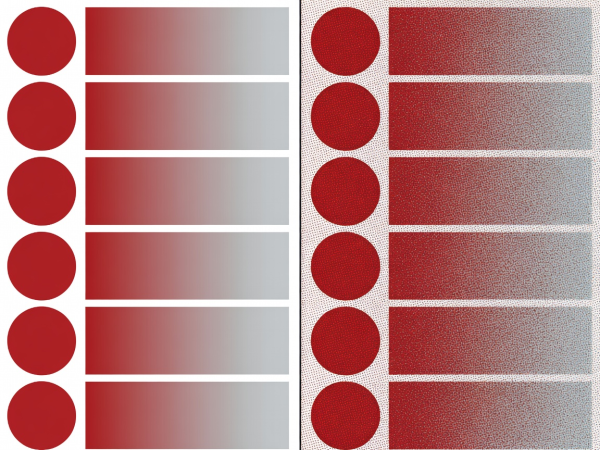
Why do flat vector illustrations like ours look spotless inside a classic `.gif` file while live-action video turns into oatmeal? Because GIF89a uses Lempel–Ziv–Welch (LZW) lossless data compression across horizontal scanlines and restricts each frame to an indexed palette of at most 256 colors. When your artwork uses five deliberate shades—near-black (`#0b0b0d`), surface slate (`#19191d`), off-white (`#f5f5f6`), silver (`#c0c4cc`), and crimson (`#dc2626`)—a GIF stores every pixel accurately in a tiny footprint.
Once you add soft drop shadows, semi-transparent sticker edges, or photographic gradients, switching to Animated WebP or AVIF cuts bandwidth by up to 75% while preserving full 8-bit alpha transparency.
| Container | Max Colors | Transparency | Timing Precision | Typical 2s Size |
|---|---|---|---|---|
| GIF89a (`.gif`) | 256 per frame | 1-bit (hard on/off) | 10 ms steps (centiseconds) | 450 KB – 1.8 MB |
| Animated WebP (`.webp`) | 16.7 million | 8-bit smooth alpha | 1 ms steps | 110 KB – 380 KB |
| APNG (`.png`) | 16.7 million | 8-bit smooth alpha | Fractional seconds | 520 KB – 2.1 MB |
| Animated AVIF (`.avif`) | 10-bit / 12-bit HDR | Full alpha channel | Timescale ticks | 45 KB – 160 KB |
| Muted MP4 (H.264) | 16.7 million | None (rectangular) | Exact framerate (24/30/60) | 65 KB – 220 KB |
Here is a technical quirk that catches even veteran animators off guard: the GIF89a header does not store frames per second. Instead, each Graphics Control Extension block stores a Delay Time integer measured in hundredths of a second (centiseconds).
If you animate at standard film speed (24 fps), each frame lasts 41.66 milliseconds. Because a GIF can only record integer centiseconds, your exporter must round every frame to either `4` (40 ms = 25 fps) or `5` (50 ms = 20 fps). Worse, if you export at 60 fps (`1.66` centiseconds), historic browsers like Internet Explorer and modern Chromium/Gecko engines enforce a minimum threshold: any delay under `2` centiseconds gets throttled to `10` centiseconds (100 ms), suddenly slowing your frantic reaction down to a sluggish 10 fps. Export GIFs at 20 fps (5 cs) or 25 fps (4 cs) for rock-solid timing everywhere.
50 ms exact frame duration. Zero rounding jitter across Safari, Firefox, Chrome, Discord, and Slack desktop clients.
40 ms exact frame duration. Snappy enough for smear frames while staying safely above browser throttle limits.
About cookies We use necessary cookies to run the site and, with your consent, optional ones to measure visits. You can change this at any time. More about cookies